DIY Repair: How to Enter Diagnostic Mode on a Frigidaire Electric Laundry Center
Is your Frigidaire Electric Laundry Center (the stacked washer/dryer combo) acting up? Before you call an expensive repair technician, you might be able to pinpoint the exact problem yourself.
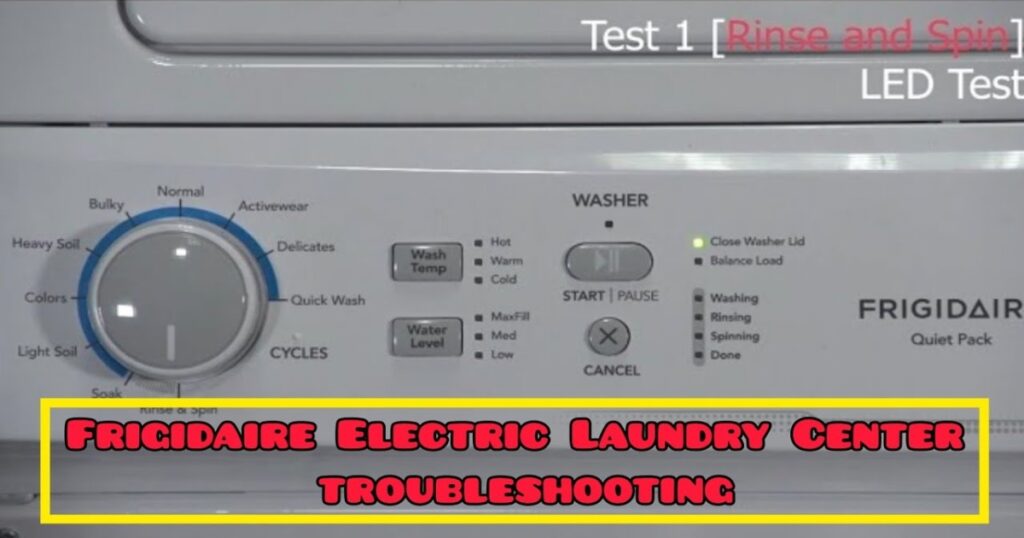
These units come equipped with powerful built-in diagnostic modes for both the washer and the dryer. These modes allow you to test individual components—like water valves, pumps, motors, and heaters—and read stored error codes using the LED display lights.
This guide will walk you through the exact steps to access these hidden menus and troubleshoot your machine like a pro.
⚠️ Important Safety Disclaimer
This guide is intended for diagnostic purposes. If you need to open panels or replace parts, always ensure the unit is completely unplugged from the power source. If you are uncomfortable at any point, consult a professional.
The Crucial First Step: “Sleep Mode”
Before attempting to enter diagnostic mode for either the washer or the dryer, the machine must be awake and then put back into a “sleep” state to reset the control board.
Do this before starting:
- Rotate the main cycle knob to any setting (like “Cycles”) to wake the machine up.
- Rotate the knob back to the off position to put it back to sleep.
Now you are ready to begin.
Part 1: Troubleshooting the Washer
If your washer isn’t filling, draining, or spinning correctly, use this mode to test the components.
1. How to Enter Washer Diagnostic Mode
- Turn the cycle selector knob to Rinse & Spin.
- Press and hold the Wash Temp and Cancel buttons simultaneously.
- Keep holding until the status LEDs start “chasing” each other sequentially. You are now in diagnostic mode.
2. Running Component Tests
Once in diagnostic mode, turning the cycle knob clockwise acts as your menu selector. Each click tests a different part:
| Number of Clicks (CW) | Knob Setting | What It Tests | What Should Happen |
| 1 Click | Soak | Hot Water | Lid locks, hot water valve opens. |
| 2 Clicks | Light Soil | Cold Water | Hot valve closes, cold water valve opens. |
| 3 Clicks | Colors | Agitation | Fills to appropriate level, then begins agitating. |
| 4 Clicks | Heavy Soil | Out-of-Balance Switch | Pull the tub forward twice within 10 seconds. Lights flash to confirm the switch felt the impact. |
| 5 Clicks | Bulky | Drain Pump | The pump turns on to empty the tub. |
| 6 Clicks | Normal | High-Speed Spin | Drain continues; tub ramps up to a high-speed spin. |
3. Exiting Washer Diagnostics
To exit the mode, turn the knob to any cycle other than Quick Wash, then press and hold Wash Temp and Cancel until you hear a chime.
Part 2: Troubleshooting the Dryer
If your dryer isn’t heating or tumbling, use this separate diagnostic mode.
1. How to Enter Dryer Diagnostic Mode
Remember to perform the “Sleep Mode” reset mentioned at the top of this article first.
- Turn the cycle selector knob to Quick Dry.
- Press and hold the Dry Temp and Cancel buttons simultaneously.
- Release when the LEDs begin chasing each other.
2. Running Component Tests
Unlike the washer, you must rotate the knob to the desired test cycle and then press the START button to activate the test.
- Test Motor (No Heat): Turn knob to Delicates and press Start. The drum should spin without heat.
- Test Heater (Electric Models): Turn knob to Active Wear and press Start.
- Test Heater (Gas Models): Turn knob to Normal and press Start.
3. Exiting Dryer Diagnostics
To exit, turn the knob to any cycle other than 15 Min Dry, then press and hold Dry Temp and Cancel until you hear a long beep.
Part 3: Reading Error Codes (The “Secret Language”)
Both the washer and dryer use the status lights to flash error codes. These units don’t have digital displays, so you have to count the flashes.
How to Read the Flashes:
- Red Flashes = The first digit of the error code.
- Green Flashes = The second digit of the error code.
- Example: 5 red flashes followed by 2 green flashes = Error Code 52.
Finding Washer Error Codes:
- Enter Washer Diagnostic Mode (see Part 1).
- Turn the knob to Quick Wash.
- Observe and count the red and green flashes.
Finding Dryer Error Codes:
- Enter Dryer Diagnostic Mode (see Part 2).
- Turn the knob to 15 Min Dry.
- Observe and count the red and green flashes.
Once you have your code (e.g., Error 51, Error 52), you can search online or in your tech sheet to identify the specific part causing the issue.
How to Clear Error Codes:
While viewing the error code (on “Quick Wash” for washer or “15 Min Dry” for dryer), press and hold the Temp and Cancel buttons for that respective unit until the flashing stops.
By using these diagnostic modes, you can stop guessing what’s wrong with your Frigidaire Laundry Center and start fixing it!

I am a master Appliance Repair technician with over 35 years of experience in the field. I am passionate about helping people troubleshoot their appliances and fix common problems. My website, appliancemode.com, provides a wealth of information on troubleshooting common appliance issues and deciphering error codes. This website aims to empower people to tackle appliance repairs themselves and save money on service calls.